
Introduction:
I want to start by setting some expectations: this post is not anti-AI; AI has got very divisive in the wider discourse and within the developer discourse, and although I do have concerns around AI in software development, it is the future, and I see my concerns more as challenges to overcome, not blockers to AI adoption.
Second, as the title implies, this is about my hobby projects; I do software development outside my paid employment. I won’t cover how I use AI in my professional life, though I do use it. This is mainly for two reasons: there are far better articles online about people’s setups, and second, it is not my information to share; how my employer and I use AI is their information.
Lastly, I fund all the AI tooling and usage discussed here out of my own pocket.
AI has fundamentally changed the coding landscape; code is no longer the expensive resource that it used to be, and that is great. That will ultimately let people do more, faster, and unlock new opportunities for everyone.
This, however, leaves coding as a hobby in a strange position: when you can generate anything you can imagine, and many things you can’t, what is the value of the code you produce outside a professional setting?
I see it as twofold. It is fun to write code; well, it is for me. I saw this LinkedIn post by an amazing computer scientist at Google, Laurie (Wired) Kirk. She also has an amazing YouTube channel you should go watch.
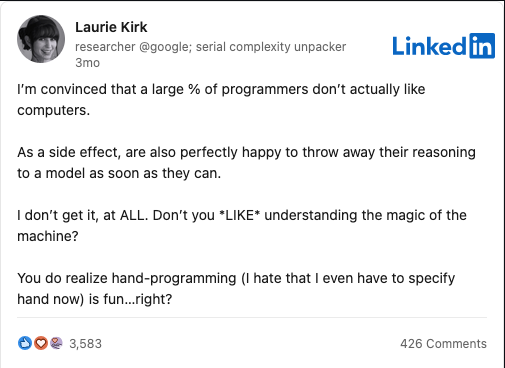
I totally agree with this; in a professional setting, it matters less because the goal is the end product, but as a hobbyist, I feel this way. The second reason Laurie highlights is also important to me: to learn how the machine works and how it achieves what you want. Understanding the abstractions makes you a better developer, but it also lets you marvel at all the engineers who came before you.
When I write code, I feel like it is going on an adventure; I don’t know what I’ll discover and learn along the way, and that excites me. I am fascinated by computers and technology more broadly, so every time I learn how it works and see behind the curtain, it’s a joy.
So, given all that, how does AI fit?
Choosing a reason
When I write code outside my day job, it usually falls into one of three buckets, and those buckets determine how I use AI.
- I need that thing to exist. This is when I want to automate something or do something and only care about the end result. A recent example was generating geometric patterns in Figma or parsing a CSV file to figure out where I was spending most of my money.
- I want to build a project to learn something new, add a new skill, or where the journey to me is just as important as the end result. A recent example is that I have been building a setup script in Bash to configure a fresh install of a Debian-based Linux distribution how I like it. Although I wanted this tool, I also wanted to learn to write better Bash scripts and see what Bash scripting can do beyond the basic scripts I had been creating.
- I want to see if an idea is worth pursuing: does this work, what does it look like, what are the pros and cons? In agile, you may call this a spike.
As a side note, I have also found this useful for managing my own shortcomings with hobbyist projects, especially finishing. When you are building something for yourself, finishing can be hard; there is no deadline or a project manager, and it is meant to be fun. Adding more of that will just make it feel like work. Using the above categories helps me define what “done” means and put it on a Trello board. That way, I can finish that when I meet that definition of done. The definition of done might not be a finished project; it might be that I learned what I wanted to, or that, in the process of doing X, I found it is better to do Y, so X is now done.
It also helps you think about your goal for starting that project: is it a hobby, or a side hustle? They are very different things and will ultimately require different workflows. If you’re building a side hustle, I think you’ll care more about how AI fits into a production workflow, since the goals of both align much better.
So how do I use AI
Once I decide which bucket the project sits in, that guides how I use AI. These aren’t hard-and-fast rules about AI, just guidelines for myself.
So first, no matter the project, I often use AI as a sounding board, exploring ideas in a chat session. This is very much what I would do at work with colleagues, but not many people want to hear about your hobby projects; AI does (or doesn’t, but it has no choice).
Throughout the project, I will use AI to ask questions and learn how to do things. I am a big fan of OpenAI models and find them the most pleasant to work with. I find this easier and more productive than wading through 1000s of pages of documents, trying to make sense of narrow examples, or figuring out how features complement each other. When I am working on a project, writing the code is the fun part; reading a 200-page API doc isn’t. This may partly be because I’m dyslexic, and reading has been one of the slowest ways I learn.
If the projects fall into Category one above, “I just need it to exist”, I usually go with an AI-first workflow using Codex.
Here, I tell the AI what I want and work with it to build it. I find projects in this category interesting because I probably wouldn’t have made them before. At the end of the day, if it takes longer to code something than to do it manually, it probably isn’t worth coding. That has changed with AI because it can do things faster and while you do something else. These projects are often low-risk or don’t offer much opportunity to learn, or maybe I just don’t want to focus on learning right now. Not every program has to be a masterpiece of the craft; some just need to get the job done and move on.
It can also be fun to see it come to life and to use it to achieve something. This is really where AI development is meant to be used: when the end product is the goal. In many cases, this is true, especially in a professional setting, which is why my AI workflows are so different.
Outside that first use case, I tend not to let AI generate code. I mentioned recently that I moved to using NVIM for coding, and for hobby projects, I turn off all AI code-assistance tools. I personally find little to no use in the AI autocomplete because it is just too noisy. When I am writing code myself, I want to write it, and this constant barrage of suggestions is beyond annoying.
I find reviewing AI code isn’t a good way to learn; it may show you things you didn’t know were possible or make you see a different way of working, but it is hard to internalise what the code does just by reading it. This may be just part of how I learn, but I find that doing it and writing the code builds a much better understanding. AI can show you new tools in your toolbox, but until you use them, I don’t truly understand them.
The final place where I use AI is code review. This especially applies to code I plan to release. As mentioned earlier, one of the biggest issues with hobby single-developer projects is that you don’t have a team to help spot problems, suggest better ways of doing things, or generally validate the code you are authoring. I have learnt so much from code reviews; they don’t just catch mistakes; they help you think better about a problem space, and that is useful. If you plan to release your code to others, even if, like mine, it is unlikely to be used, you owe them the best version you can make. The tool that I use for this is called Code Rabbit, but others exist. I think AI code review is by far one of the most useful tools we have now. We used to rely on linting, security scanning, and formatters, but AI gives us a second pair of eyes. That said, those other things are still important, even in this new world.
Conclusion
I have a passing interest in machining, which is using machine tools to make metal (or other material) parts. It isn’t one of my hobbies, but I do consume machining content on YouTube. If you know anything about this space, many hobbyist machinists use manual machines, even though CNC machines are relatively available. This is because what matters to a hobbyist isn’t what matters to a production machine shop. In production, you want the part so you can sell it and get paid; in a hobbyist shop, it is about the process. It is about learning how to solve the problems and develop your skills with every project you make.
I think that this is the same philosophy as coding. AI exists and is like the CNC tools, but there is still something magical, fun and exciting about going manual. The requirements for a hobbyist and for a professional are very different. As a hobbyist developer, I think it is okay to use as much or as little AI as you want. Its usage depends on your own goals, and there is nothing wrong with wanting something to just exist, but there is also nothing wrong with wanting to immerse yourself in the craft.
About the author
- I am a Platform Lead Engineer with over 17 years of experience. I have worked in a variety of industries, providing technical and design work and technical leadership.
Comments
Join the discussionI am basically my own hobby project. This was a great read.